







If you just want to download the beta software, scroll to the bottom of this post.
So, I started my job as Director of IT for OutBack Power coming up on two years ago, and part of what I did was get all of our server gear to run off of OutBack inverters for power backup support. The dual inverter stack and battery bank can crank out 7.2kW of power and run our gear for over a full 8 hour day. There was only one problem… OutBack inverters are not designed to be used as computer UPS devices. One glaring issue was the lack of software support for doing one of the most basic UPS tasks; shutting down computers.
Being an old hand at classic VB, I whipped up a piece of software that performed a stepped shutdown of gear based on battery charge levels. First the non-essential stuff goes down, then the more important servers, then the critical stuff, and lastly the phone system keeps on going until the batteries finally give out and the power dies. After a few tests and a few more adjustments, I had it nailed. Everything worked like it was supposed to.
After a while, a few of our field people learned of my server shutdown solution and let me know they knew customers who wanted this capability. The problem was, the software was a mess. Hardly any kind of user interface to speak of, and there was no way to change settings without hand editing an INI file and restarting the software. Nope, this pile of code couldn’t be released… I’d have no time to support all the questions and all the crazy settings and paces people would undoubtedly put the software through.
Another issue was the fact that I only had to deal with one environmental control machine connected to the inverters, while I was being told customers with whole classrooms full of computers connected to OutBack inverters were looking for a solid shutdown solution. So, I set about working on two pieces of software that would be fit for release; MateNet and PowerDown.
Both applications work together to receive and process serial data coming from the OutBack Power Mate device. MateNet runs on the computer that is physically connected to the Mate device via serial cable. PowerDown connects to the MateNet host over a TCP network connection and runs on all Windows based computers that you want to protect against major power failure. Here are two basic examples of how it all works together.
In this example, there are 5 workstations running PowerDown, and one workstation that is physically connected to the Mate and running both MateNet and PowerDown.
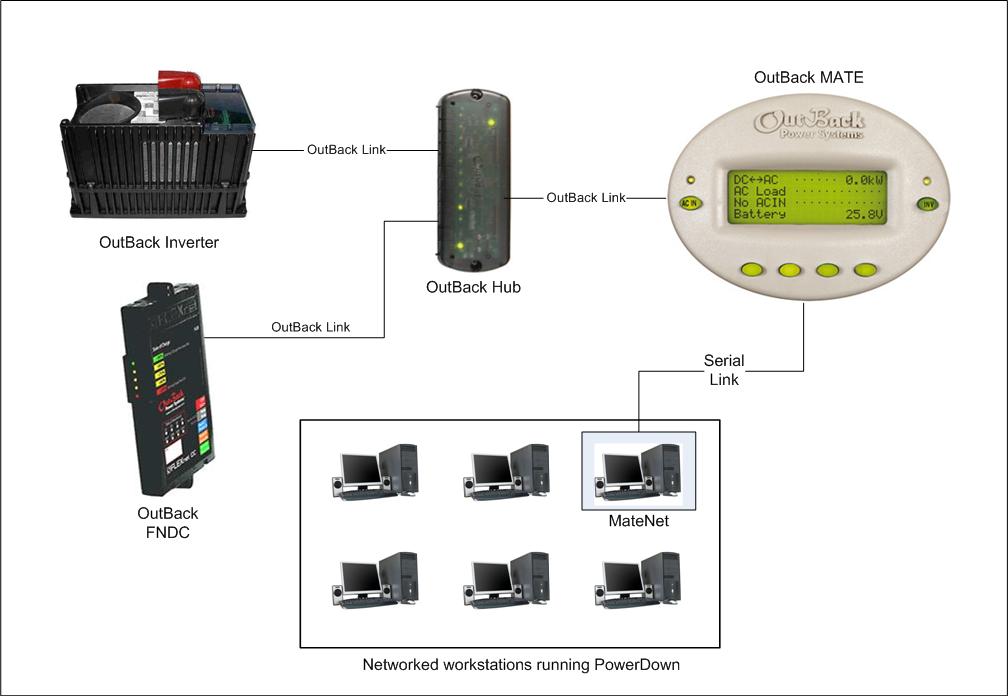
Typical group of protected workstations
In this example, there are 6 workstations running PowerDown, and a dedicated workstation or server that is running both MateNet & PowerDown.
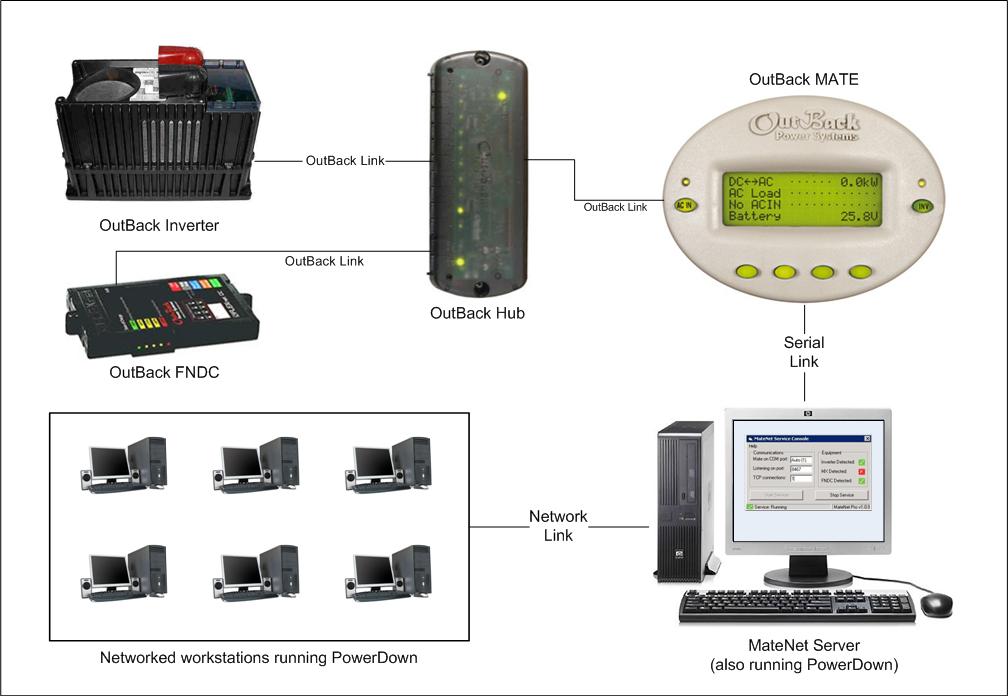
MateNet running on a dedicated control system or server
Disclaimer: This is a personal project, not an OutBack Power product!
Download MateNet v1.0
Download PowerDown v1.0
For more information about these software applications, please visit http://support.amal.net
Tags: software
